



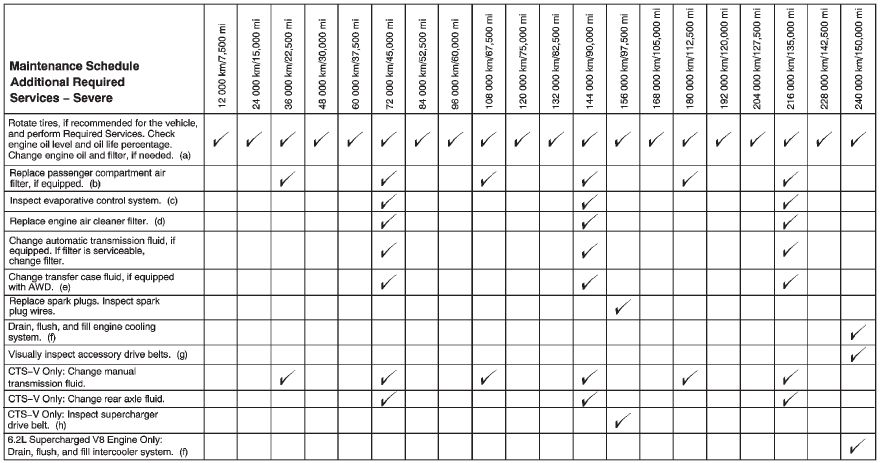
Footnotes — Maintenance Schedule Additional Required Services — Normal
a) Vehicles with different size front and rear tires do not have tire rotation. See Tire Rotation.
b) Or every two years, whichever comes first. More frequent replacement may be needed if the vehicle is driven in areas with heavy traffic, areas with poor air quality, or areas with high dust levels.
Replacement may also be needed if there is a reduction in air flow, excessive window fogging, or odors.
c) Check all fuel and vapor lines and hoses for proper hook–up, routing, and condition. Check that the purge valve, if the vehicle has one, works properly. Replace as needed.
d) Or every four years, whichever comes first.
e) Do not directly power wash the transfer case output seals. High pressure water can overcome the seals and contaminate the transfer case fluid. Contaminated fluid will decrease the life of the transfer case and should be replaced.
f) Or every five years, whichever comes first. See Cooling System.
g) Or every 10 years, whichever comes first. Inspect for fraying, excessive cracking, or damage; replace, if needed.
h) Inspect for fraying, excessive cracking, or damage; replace, if needed.
See also:
Replacing LATCH System Parts After a Crash
WARNING!
A crash can damage the LATCH
system in the vehicle. A damaged
LATCH system may not properly
secure the child restraint,
resulting in serious injury or even
death in a crash. To hel ...
Listing All Paired and Connected
Phones
1. Press and hold for
two seconds. For vehicles with
a navigation system say
“Hands Free” after the tone.
2. Say “Bluetooth.”
3. Say “List.” ...
Door Ajar Messages
DRIVER DOOR OPEN
This message displays when the
driver door is not closed completely.
Close the door completely.
HOOD OPEN
This message displays when the
hood is not closed completely.
Make s ...