



Battery Replacement
Notice: When replacing the battery, do not touch any of the circuitry on
the transmitter.
Static from your body could damage the transmitter.
Replace the battery if the REPLACE BATTERY IN REMOTE KEY message displays in the DIC.
1. Press the button near the bottom of the transmitter and pull the key out.
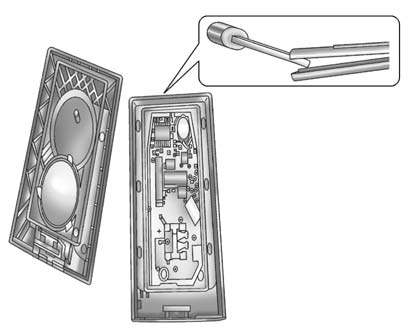
2. Use the key blade to separate the two halves of the transmitter.
3. Remove the old battery.
Do not use a metal object.
4. Insert the new battery, positive side facing down. Replace with a CR2032
or equivalent battery.
5. Snap the transmitter back together.
See also:
Wheels and Trim—Aluminum
or Chrome
Use a soft, clean cloth with mild
soap and water to clean the wheels.
After rinsing thoroughly with clean
water, dry with a soft, clean towel.
A wax may then be applied.
Notice: Chrome wheels a ...
How to Detect a Tamper Condition
If is pressed and the horn
sounds, an attempted break-in has
occurred while the system was
armed.
If the alarm has been activated, the
THEFT ATTEMPTED message will
appear on the DIC. See A ...
Checking Engine Oil
It is a good idea to check the
engine oil level at each fuel fill.
In order to get an accurate reading,
the vehicle must be on level
ground. The engine oil dipstick
handle is a yellow loop. S ...