



Programming with a Recognized Transmitter
A new transmitter can be programmed to the vehicle when there is one recognized transmitter.
For vehicles sold in Canada, two recognized transmitters are required to program a new transmitter.
1. Make sure the vehicle is off.
2. Place the recognized transmitter(s) in the cupholder.
Have the new transmitter available with you.
3. Insert the vehicle key into the key lock cylinder located on the outside of the driver door.
4. Turn the key to the unlock position five times within five seconds.
5. The Driver Information Center (DIC) displays READY TO LEARN ELECTRONIC KEY #2, 3 or 4.
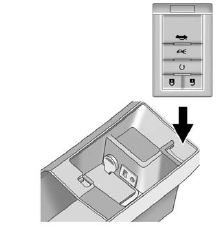
6. Place the new transmitter into the transmitter pocket with the buttons facing the front of the vehicle. The transmitter pocket is inside the center console storage area located between the driver and front passenger seats.
7. A beep sounds once the transmitter is programmed.
The DIC displays READY TO LEARN ELECTRONIC KEY #3 or 4, or MAXIMUM # ELECTRONIC KEYS LEARNED.
8. Press the ignition control knob to exit programming mode.
9. Remove the transmitter from the
transmitter pocket and press  on the keyless access
transmitter two times.
on the keyless access
transmitter two times.
10. To program additional transmitters, repeat Steps 6 through 9.
See also:
Adding or Changing Preset Destinations
This feature allows additions or changes one of five preset destinations. When
a destination has been added as a preset destination, it is available to select
from the Destination Entry screen. Se ...
Windshield Washer
WARNING!
In freezing weather, do not use
the washer until the windshield
is warmed. Otherwise the
washer fluid can form ice on the
windshield, blocking your vision. ...
Repair Facility
GM also recommends that you choose a collision repair facility that meets your
needs before you ever need collision repairs. Your dealer may have a collision repair
center with GM-trained technici ...