



Instrument Panel
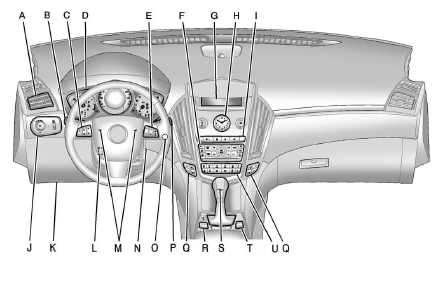
A. Air Vents.
B. Turn and Lane—Change Lever.
See Turn and Lane-Change Signals.
Driver Information Center (DIC) Controls. See Driver Information Center (DIC).
C. Cruise Control.
Heated Steering Wheel (If Equipped).
D. Instrument Cluster.
E. Steering Wheel Controls.
F. AM-FM Radio.
Navigation System (If Equipped). See Navigation System Manual.
G. Driver Information Center (DIC) Display. See Driver Information Center (DIC).
H. Clock (Analog Clock) or Clock (Digital Clock).
I. Navigation Display Control (If Equipped). See Navigation System Manual.
Safety Locks.
Power Door Locks.
Hazard Warning Flashers.
Phone Button (If Equipped).
See Bluetooth (Voice Recognition) or Bluetooth (Overview) or Bluetooth (UHP Mexico Only) or Bluetooth (Infotainment Controls).
J. Exterior Lamp Controls.
Front Fog Lamps (If Equipped).
Instrument Panel Illumination Control.
K. Data Link Connector (DLC) (Out of View). See Malfunction Indicator Lamp.
L. Steering Wheel Adjustment.
M. Horn.
N. Adjustable Pedal Control (If Equipped). See Adjustable Throttle and Brake Pedal.
O. Start/Stop Button. See Ignition Positions.
P. Windshield Wiper/Washer.
Rear Window Wiper/Washer.
Q. Heated and Ventilated Front Seats (If Equipped).
R. Parking Brake.
S. Shift Lever. See Automatic Transmission.
T. StabiliTrak® System.
Ultrasonic Parking Assist (If Equipped).
Economy Mode (If Equipped).
See Fuel Economy Mode U. Dual Automatic Climate Control System.
See also:
Battery Power Protection
This feature shuts off the dome lamps if they are left on for more than 10 minutes
when the ignition is in LOCK/OFF. This helps to prevent the battery from running
down. ...
Engine Drive Belt Routing
CTS V6 Engines
CTS-V 6.2L V8 Engine ...
Connecting to a Different Phone
To connect to a different cell phone,
the Bluetooth system looks for the
next available cell phone in the
order in which all available cell
phones were paired. Depending on
which cell phone ...