



Sunroof
On vehicles with a sunroof, the switches are on the overhead console.
The sunroof only operates when the ignition is in ON/RUN/START or ACC/ACCESSORY, or in Retained Accessory Power (RAP).
See Ignition Positions and Retained Accessory Power (RAP).
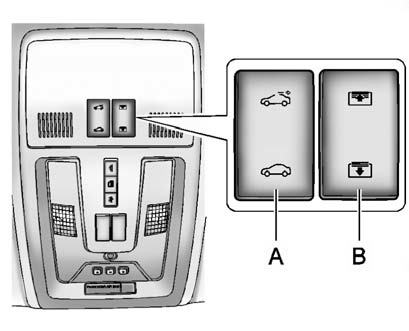
A. Sunroof Switch
B. Sunshade Switch
To open the sunroof, press the back of the sunroof switch (A) to the first detent and release, the sunroof will open to the vent position.
Press the back of the sunroof switch to the first detent and hold, to open the sunroof to a desired position at a normal speed. Press the rear of the switch to the second detent and release, to express open the sunroof to an automatically adjusted comfort position. Press the rear of the switch to the second detent and release again, to open the sunroof to the full open position. Press the front of the switch to second detent and release, to express close the sunroof.
Press the front of the sunroof switch to the first detent and hold, to close the sunroof to a desired position at a normal speed. Press the front of the switch to the second detent and release, to express close the sunroof.
To open or close the sunshade, press the open or close sunroof switch (B).
Press the front or back of the sunshade switch to the first detent and hold, to open or close the sunshade to a desired position at a normal speed. Press the switch to the second detent and release, to express open or close the sunshade.
Fully close the glass before fully closing the sunshade.
See also:
Driving for Better Fuel Economy
Driving habits can affect fuel mileage. Here are some driving tips to get
the best fuel economy possible.
- Avoid fast starts and accelerate smoothly.
- Brake gradually and avoid abrupt stops.
- ...
Tire Pressure Monitor
This vehicle may have a Tire
Pressure Monitor System (TPMS).
The TPMS warning light alerts you
to a significant loss in pressure of
one of the vehicle's tires. If the
warning light comes on ...
Control Buttons
The knobs and buttons used to
control the radio are:
(XM): Press to choose the
XM band (if equipped).
TUNE/TONE: Turn to search for
stations. Press to enter the
Tone menu.
MENU/SELECT: Tur ...