



Center Console Storage
The center console has an armrest, upper storage tray, and a lower storage area.
The armrest can be adjusted to a rearward, middle, and forward position. Slide the top of the armrest to adjust to the desired position.
To access the storage, move the armrest to the full rearward position to access the storage compartment buttons.
Push the driver side button to access the upper storage tray.
Push the passenger side button to access the lower storage area.
There is an accessory power outlet inside the center console.
See Power Outlets for more information.
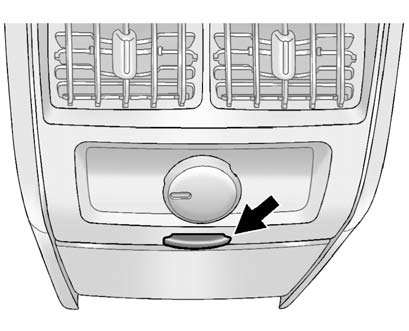
Push the button to open the storage area located at the rear of the center console.
See also:
Exterior Lamp Controls
The exterior lamps control is located on the instrument panel to the left of
the steering wheel.
It controls the following systems:
Headlamps
Taillamps
Parking Lamps
License Plate Lamps ...
Vehicle Data Recording and Privacy
This GM vehicle has a number of sophisticated computers that record
information about the vehicle’s performance and how it is driven.
For example, the vehicle uses computer modules to monitor and ...
Windshield Wiper/Washer
The front and rear wiper controls are located on the turn and lane-change lever.
Turn the band with the wiper symbol to control the windshield wipers.
: For a single wipe, turn to
, then release. ...