



Turn and Lane-Change Signals
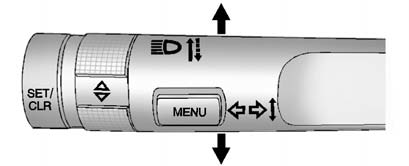
An arrow on the instrument panel cluster will flash in the direction of the turn or lane change.
Move the lever all the way up or down to signal a turn.
Raise or lower the lever until the arrow starts to flash to signal a lane change. The turn signal flashes three times.
The lever returns to its starting position when it is released.
If after signaling a turn or lane change the arrow flashes rapidly or does not come on, a signal bulb may be burned out.
Replace any burned out bulbs.
If the bulb is not burned out, check the fuse. See Fuses and Circuit Breakers for more information.
See also:
Replacing Safety Belt System Parts after a Crash
WARNING
A crash can damage the safety belt system in the vehicle. A damaged safety belt
system may not properly protect the person using it, resulting in serious injury
or even death in a cr ...
Used Replacement Wheels
WARNING
Replacing a wheel with a used one is dangerous. How it has been used or how far
it has been driven may be unknown. It could fail suddenly and cause a crash. When
replacing wheels, us ...
Recording from MP3/WMA
Discs or USB
REC (Record): Press to start
recording tracks from an MP3/WMA
disc or a USB device (excluding
iPods) while it is playing. The radio
has the option to record the current
track playing or all ...