



Dome Lamps
The dome lamp is located in the overhead console.
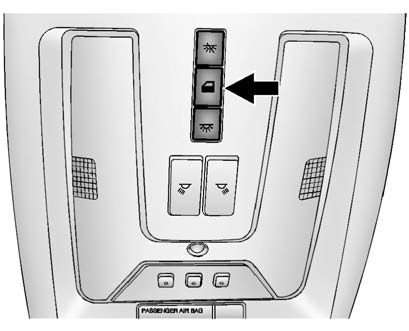
To change the dome lamp settings, press the following:
 (Dome Lamp Override): Turns the lamp off, even when a door is open.
 (Door): The lamp comes on automatically when a door is opened.
 (On): Turns the dome lamp on.
See also:
Dolly Towing (All-Wheel—Drive Vehicles)
All-wheel—drive vehicles should not be towed with two wheels on the ground.
To properly tow these vehicles, they should be placed on a platform trailer
with all four wheels off of the ground or ding ...
Dual Tone Multi-Frequency (DTMF) Tones
The in—vehicle Bluetooth system can send numbers during a call. This is used
when calling a menu—driven phone system.
1. Turn or press the MENU/ SELECT knob and select Enter Number.
2. Enter the ...
Supercharged powertrain
The Cadillac CTS-V Coupe employs the LSA 6.2L supercharged V-8 engine also
found on the CTS-V Sport Sedan. Rated at 556 horsepower (415 kW) and 551 lb.-ft.
of torque (747 Nm), it is the most power ...