



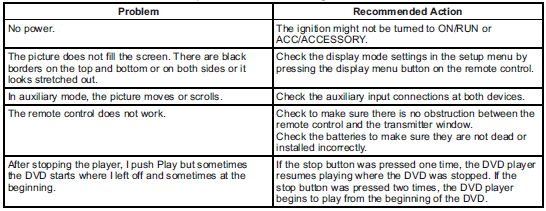
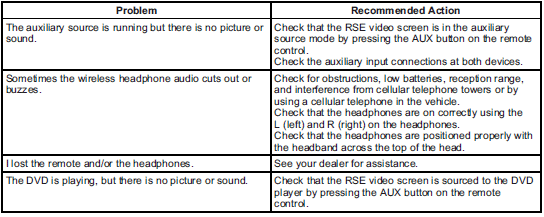
Tips and Troubleshooting Chart
Cadillac SRX / Cadillac SRX Owners Manual / Infotainment System / Rear Seat Infotainment / Rear Seat Entertainment (RSE) System / Tips and Troubleshooting Chart
See also:
Rear Compartment
Fuse Block
(CTS-V Coupe and
Sedan)
The rear compartment fuse block is
located on top of the battery, on the
right side of the trunk. The battery
access door must be removed to
access the fuse block.
The vehicle may not be equi ...
Engine Oil Messages
CHANGE ENGINE OIL SOON
When this message displays, it
means that service is required for
the vehicle. See your dealer.
See Maintenance Schedule and Engine Oil for more information.
When you res ...
Charging System Light
This light comes on briefly when the ignition key is turned to START, but the
engine is not running, as a check to show it is working.
If it does not, have the vehicle serviced by your dealer.
T ...