



Tire and Loading Information Label
 " width=409 height=331
id="_x0000_i1624" src="images/books/1183/6/index.39.gif" border=0>
" width=409 height=331
id="_x0000_i1624" src="images/books/1183/6/index.39.gif" border=0>
Label Examp
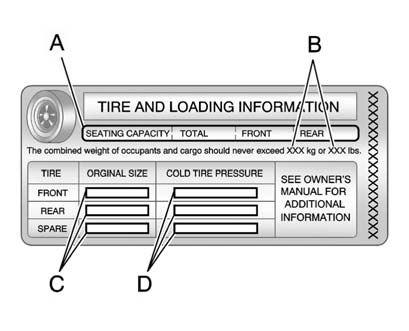
A vehicle-specific Tire and Loading Information label is attached to the vehicle's center pillar (B-pillar). With the driver door open, the label is attached near the door lock post. The Tire and Loading Information label shows the number of occupant seating positions (A), and the maximum vehicle capacity weight (B) in kilograms and pounds.
The Tire and Loading Information label also shows the tire size of the original equipment tires (C) and the recommended cold tire inflation pressures (D). For more information on tires and inflation see Tires and Tire Pressure.
There is also important loading information on the Certification label. It tells you the Gross Vehicle Weight Rating (GVWR) and the Gross Axle Weight Rating (GAWR) for the front and rear axle. See “Certification Label” later in this section.
See also:
Reclining Seatbacks
WARNING!
Sitting in a reclined position when
the vehicle is in motion can be
dangerous. Even when buckled
up, the safety belts cannot do
their job.
The shoulder belt will not be
against yo ...
Interior
Two rows of seats accommodate five occupants. Second-row seats fold forward
to allow 54.3 cubic feet of cargo space. Folding the midgate creates an
expanded, continuous load floor for the bed, but ...
Battery Load Management
The vehicle has Electric Power Management (EPM) that estimates the battery's
temperature and state of charge. It then adjusts the voltage for best performance
and extended life of the battery. ...