



Engine Cover
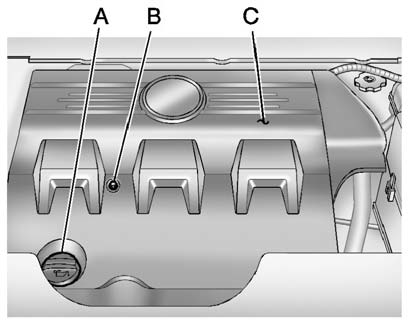
A. Oil Fill Cap
B. Engine Cover Bolt
C. Engine Cover
To remove:
1. Remove the oil fill cap (A).
2. Remove the engine cover bolt (B).
3. Raise the engine cover (C) to release from the retainers.
4. Lift and remove the engine cover.
5. Reverse Steps 1 through 4 to reinstall engine cover.
See also:
Hitch Cover (without Dual Exhaust)
The vehicle may have a hitch cover. To remove the hitch cover:
1. Turn the fasteners on the lower tabs 90 degrees counterclockwise.
2. Lift the lower edge of the cover about 45 degrees.
3. Pull t ...
Lamps On Reminder
This light comes on whenever the
parking lamps are on.
See Exterior Lamps Off Reminder for more information. ...
Manual Fold and Tumble Feature
Folding and Tumbling the Seat
To fold and tumble the seat:
1. Make sure that there is nothing under, in front of, or on the seat.
Notice: Folding a rear seat with the safety belts still fastened ma ...