



License Plate Lamp
To replace one of these bulbs:
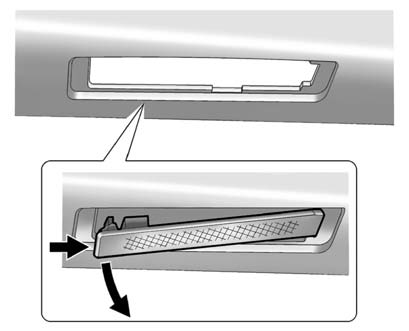
1. Open the liftgate. See Liftgate for more information.
 " width=409 height=331
id="_x0000_i1717" src="images/books/1183/8/index.21.gif" border=0>
" width=409 height=331
id="_x0000_i1717" src="images/books/1183/8/index.21.gif" border=0>
Passenger Side Shown, Driver Side Similar
2. Push the left end of the lamp assembly towards the right.
3. Turn the lamp assembly down to remove from liftgate.
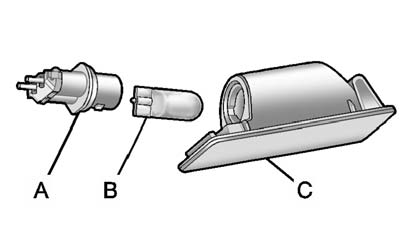
A. Bulb Socket
B. Bulb
C. Lamp Assembly
4. Turn the bulb socket (A) counterclockwise to remove from lamp assembly
(C).
5. Pull the bulb (B) straight out of the bulb socket.
6. Push the replacement bulb straight into the bulb socket and turn the bulb
socket clockwise to install into lamp assembly.
7. Turn the lamp assembly into the liftgate engaging the clip side first.
8. Push on the lamp side opposite the clip until the lamp assembly snaps into
place.
See also:
Boost Gauge
Metric
English
For the CTS-V, this gauge is located
in the instrument panel cluster.
This gauge indicates positive
manifold pressure, which is the
induction air pressure level in the
in ...
Tire Pressure Monitor Operation
This vehicle may have a Tire Pressure Monitor System (TPMS). The TPMS is designed
to warn the driver when a low tire pressure condition exists. TPMS sensors are mounted
onto each tire and wheel as ...
Door Locks (Sedan and Wagon)
WARNING!
Unlocked doors can be
dangerous.
- Passengers, especially
children, can easily open the
doors and fall out of a moving
vehicle. When a door is
locked, the handle will not
open i ...