



Removing the Spare Tire and Tools
To access the spare tire and tools:
1. Open the liftgate. See Liftgate .
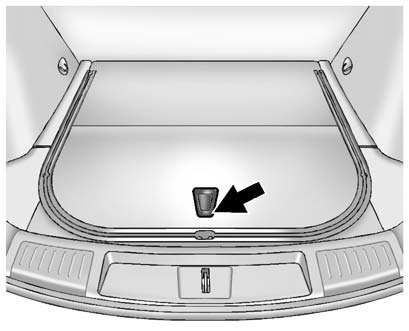
2. Press on the bottom of the handle assembly to unlatch it and lift up on the handle.
The prop rod locks into place when open.
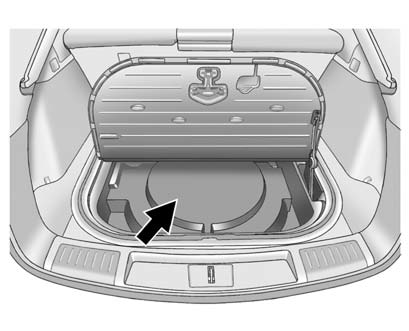
3. Remove the spare tire cover.
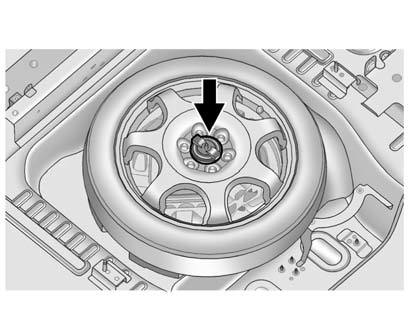
4. Remove the nut retaining the spare tire.
5. Remove the spare tire and place it next to the tire being changed.
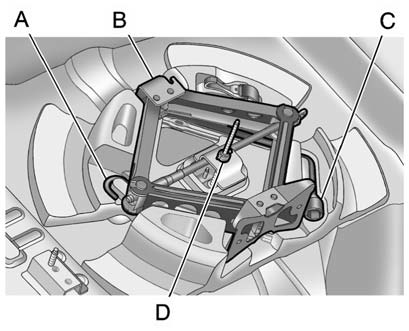
6. Remove the wing nut (D).
7. Remove the extension (A), jack (B) and wheel wrench (C) and place them near
the tire being changed.
See also:
Front Fog Lamp Light
The fog lamp light comes on when the fog lamps are in use.
The light goes out when the fog lamps are turned off. See Front Fog Lamps
for more information. ...
TIRE LEARNING ACTIVE
This message displays when the
Tire Pressure Monitor System
(TPMS) is re-learning the tire
positions on the vehicle.
The tire positions must be
re-learned after rotating the tires
or after ...
Safety
The Escalade ESV's second-row captain's chairs had the only Latch anchors in
this three-row SUV. The Latch anchors are easy to access. The tether anchors are
at the bottom of the captain's chair s ...