



Windshield Wiper/Washer
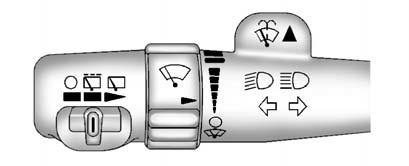
The front and rear wiper controls are located on the turn and lane-change lever.
Turn the band with the wiper symbol to control the windshield wipers.
 : For a single wipe, turn to
, then release. For several wipes, hold
the band on longer.
: For a single wipe, turn to
, then release. For several wipes, hold
the band on longer.
 : Turns the windshield wipers off.
 : Turn the band up for more frequent
wipes or down for less frequent wipes.
: Turn the band up for more frequent
wipes or down for less frequent wipes.
 : Slow wipes.
 : Fast wipes.
 : Push the paddle at the top of the
lever to spray washer fluid on the windshield.
: Push the paddle at the top of the
lever to spray washer fluid on the windshield.
Rear Wiper Window Wiper/Washer
To turn the rear wiper on, slide the lever to a wiper position.
: Turns the wiper off.
 : Turns on the rear wiper delay.
 : Turns on the rear wiper.
 : Press the button on the end of the
lever to spray washer fluid on the rear window.
: Press the button on the end of the
lever to spray washer fluid on the rear window.
See Windshield Wiper/Washer and Rear Window Wiper/Washer .
See also:
Cleaning the RSE Overhead Console
When cleaning the RSE overhead console surface, use only a clean cloth dampened
with clean water. Infotainment System 7-41 Cleaning the Video Screen When cleaning
the video screen, use only a clea ...
Customer Assistance Offices (U.S. and Canada)
Cadillac encourages customers to call the toll-free number for assistance. However,
if a customer wishes to write or e-mail Cadillac, the letter should be addressed
to:
United States
Cadillac Cu ...
Cadillac CTS-V Review
In an effort to take advantage of its recent return to popularity, Cadillac decided to build high-performance versions of several of its cars. Collectively called the V-Series, they are meant to be ...