



Map Destination Screen Functions
If the map screen is used to show destination, it will have map screen capabilities such as GO, Mark, Zoom, Scroll, etc. The address is shown at the top of the screen.
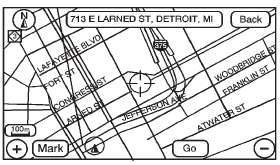
Destination Map Screen
See also:
PARKING ASSIST OFF
After the vehicle has been started,
this message displays to remind the
driver that the URPA system has
been turned off. This message also
displays when there is a temporary
condition causin ...
Lap-Shoulder Belt
All seating positions in the vehicle have a lap-shoulder belt.
The following instructions explain how to wear a lap-shoulder belt properly.
1. Adjust the seat, if the seat is adjustable, so you ...
Traction – AA, A, B, C
The traction grades, from
highest to lowest, are AA, A,
B, and C. Those grades
represent the tire's ability to
stop on wet pavement as
measured under controlled
conditions on specified
g ...