



Programming with a Recognized Transmitter
A new transmitter can be programmed to the vehicle when there is one recognized transmitter.
For vehicles sold in Canada, two recognized transmitters are required to program a new transmitter.
1. Make sure the vehicle is off.
2. Place the recognized transmitter(s) in the cupholder.
Have the new transmitter available with you.
3. Insert the vehicle key into the key lock cylinder located on the outside of the driver door.
4. Turn the key to the unlock position five times within five seconds.
5. The Driver Information Center (DIC) displays READY TO LEARN ELECTRONIC KEY #2, 3 or 4.
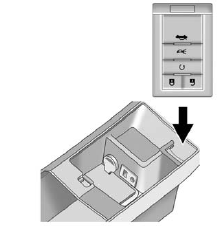
6. Place the new transmitter into the transmitter pocket with the buttons facing the front of the vehicle. The transmitter pocket is inside the center console storage area located between the driver and front passenger seats.
7. A beep sounds once the transmitter is programmed.
The DIC displays READY TO LEARN ELECTRONIC KEY #3 or 4, or MAXIMUM # ELECTRONIC KEYS LEARNED.
8. Press the ignition control knob to exit programming mode.
9. Remove the transmitter from the
transmitter pocket and press  on the keyless access
transmitter two times.
on the keyless access
transmitter two times.
10. To program additional transmitters, repeat Steps 6 through 9.
See also:
Driving Impressions
Functions on the Escalade EXT work as promised, and its performance rivals
that of the regular Escalade. But the utility of the pickup bed at the back is
debatable. Even more than a standard Escal ...
Wheel Alignment and Tire
Balance
The tires and wheels were aligned
and balanced at the factory to
provide the longest tire life and best
overall performance. Adjustments to
wheel alignment and tire balancing
will not be nec ...
Immobilizer
See Radio Frequency Statement for information
regarding Part 15 of the Federal
Communications Commission (FCC)
rules and Industry Canada
Standards RSS-GEN/210/220/310. ...