



Compass Variance (Zone) Procedure
1. Do not set the compass zone when the vehicle is moving.
On an automatic transmission vehicle, only set it when the vehicle is in P (Park). On a manual transmission vehicle, only set it when the vehicle is stopped.
Press  until PRESS
 TO
CHANGE COMPASS ZONE
displays.
TO
CHANGE COMPASS ZONE
displays.
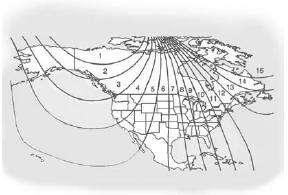
2. Find the vehicle's current location and variance zone number on the map.
Zones 1 through 15 are available.
3. Press to scroll through
and select the appropriate
variance zone.
4. Press  until the
vehicle heading, for example,
N for North, is displayed in
the DIC.
until the
vehicle heading, for example,
N for North, is displayed in
the DIC.
5. Calibrate the compass.
See “Compass Calibration Procedure” following.
See also:
Operation
Controls
The infotainment system is operated by using the pushbuttons, multifunction
knobs, menus shown on the display, and steering wheel controls, if equipped.
Turning the System On or Off
...
Exterior Lighting
Battery Saver
The exterior lamps turn off about
10 minutes after the ignition is
turned to LOCK/OFF, if the parking
lamps or headlamps have been
manually left on. This protects
against draining the batter ...
Battery Load
Management
The vehicle has Electric Power
Management (EPM) that estimates
the battery's temperature and state
of charge. It then adjusts the voltage
for best performance and extended
life of the batter ...