



Hazard Warning Flashers
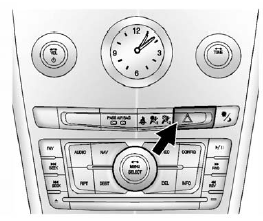
 (Hazard Warning Flasher):
Press this button located on the instrument panel near the audio system, to make the front and rear turn signal lamps flash on and off.
This warns others that you are having trouble. Press again to turn the flashers off.
See also:
Adaptive Forward
Lighting (AFL)
The Adaptive Forward Lighting
System (AFL) pivots the headlamps
horizontally to provide greater road
illumination while turning. To enable
AFL, set the exterior lamp switch on
the multifunct ...
Parking on Hills
WARNING
Parking the vehicle on a hill with the trailer attached can be dangerous. If
something goes wrong, the rig could start to move.
People can be injured, and both the vehicle and the trailer ...
Reclining Seatbacks (Bucket Seats Only)
On vehicles with second row bucket seats, the seatbacks can be reclined.
To recline the seatback:
1. Lift the lever on the outboard side of the seat.
2. Move the seatback to the desired position, ...