



Manual Transmission
If the vehicle has a manual transmission, the shift lever is located on the center console between the front seats.
The following explains how to operate the manual transmission.

CTS
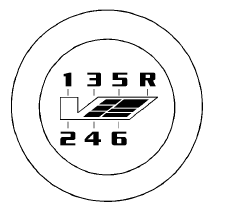
CTS-V
1 (First): Press the clutch pedal and shift into 1 (First). Slowly let up on the clutch pedal while pressing on the accelerator pedal.
Shift into 1 (First) when you are going less than 40 km/h (25 mph).
For CTS-V, shift into 1 (First) when you are going less than 64 km/h (40 mph). After a complete stop, if it is hard to shift into 1 (First), let up on the clutch pedal, then press it back down and shift into 1 (First).
2 (Second): Press the clutch pedal and let up on the accelerator pedal, then shift into 2 (Second). Then, slowly let up on the clutch pedal while accelerating.
3 (Third), 4 (Fourth), 5 (Fifth), and 6 (Sixth): Shift into 3 (Third), 4 (Fourth), 5 (Fifth), and 6 (Sixth) the same for 2 (Second).
To stop, let up on the accelerator pedal and press the brake pedal.
Just before the vehicle stops, press the clutch pedal and the brake pedal, and shift to Neutral.
Neutral: Use this position when you start or idle your engine.
Your shift lever is in Neutral when it is centered in the shift pattern, not in any gear.
R (Reverse): To back up, press down the clutch pedal, completely stop the vehicle, and shift into R (Reverse). Let up on the clutch pedal slowly while pressing the accelerator pedal.
The CTS-V transmission prevents easily shifting into R (Reverse) using normal shifting force while the vehicle is moving at more than 5 km/h (3mph), or when the ignition is in LOCK/OFF.
See also:
Reducing Speed While Using
Cruise Control
If the cruise control system is
already activated:
- Press and hold the −SET button
on the steering wheel until the
desired speed is reached, then
release it.
- To slow down in small a ...
2013 Cadillac ATS drive review
It's a great job, if you like the work. Performance engineer Kevin Zelenka
gets paid to drive in what he calls the "nonlinear zone"--a marginal-grip region
of time and space where he kee ...
Off-Road Recovery
The vehicle's right wheels can drop off the edge of a road onto the shoulder
while driving. Follow these tips:
1. Ease off the accelerator and then, if there is nothing in the way, steer the ...