



License Plate Lamp (Coupe and Sedan)
To replace one of these bulbs:
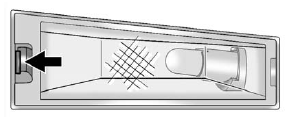
1. Push the tab to remove the license plate lamp.
2. Turn the license plate lamp assembly down to remove it.
3. Turn the socket counterclockwise and remove it.
4. Pull the bulb straight out to remove it.
5. Push the new bulb straight into the socket.
6. Reverse Steps 1 through 3 to reinstall the license plate lamp assembly.
See also:
Reclining Seatbacks (Bucket Seats Only)
On vehicles with second row bucket seats, the seatbacks can be reclined.
To recline the seatback:
1. Lift the lever on the outboard side of the seat.
2. Move the seatback to the desired position, ...
If the Off Indicator is Lit for an Adult-Size Occupant
If a person of adult-size is sitting
in the front outboard passenger
seat, but the off indicator is lit,
it could be because that person
is not sitting properly in the seat.
If this happens ...
Power Mirrors
Controls for the outside power
mirrors are on the driver door.
To adjust each mirror:
1. Press (A) or (B) to select the
driver or passenger side mirror.
2. Press the arrows on the control
p ...