



Lumbar Adjustment
Power Lumbar
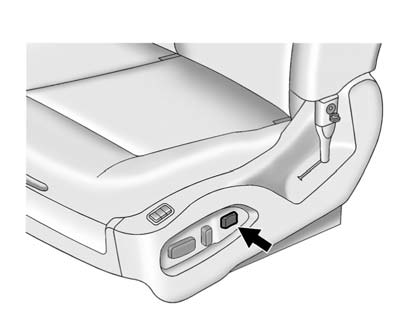
If available, press and hold the front or rear of the control to increase or decrease lumbar support. Release the control when the seatback reaches the desired level of lumbar support.
See also:
Continuous Damping Control (CDC)
This vehicle may have a continuous damping control system called Autoride® or
MagneRide™. With this feature, improved vehicle ride and handling is provided under
a variety of passenger and loading ...
Entry/Exit Recall
If the vehicle has this feature, it
allows you to select your preferred
automatic recall of stored memory
and exit positions. See Memory
Seats for more
information.
Press the customization ...
Interior Glass
To clean, use a terry cloth fabric dampened with water. Wipe droplets left behind
with a clean dry cloth. Commercial glass cleaners may be used, if necessary, after
cleaning the interior glass wit ...