



Installing the Fence
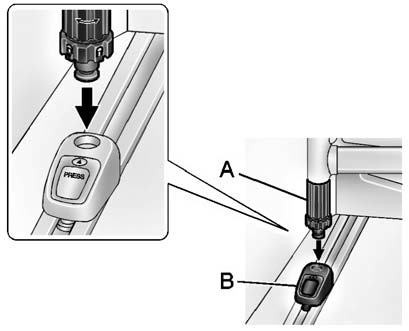
Insert the fence into the adapters and lock both latches (A) by turning to
align  with the arrow on the adapter (B).
See also:
Convenience Net (Sedan and Coupe)
The vehicle may have a
convenience net in the rear.
Put small loads behind the net.
It can also be positioned into an
envelope style to hold smaller items.
The net is not for heavier loads.
St ...
New Vehicle Break-In
Notice: The vehicle does not need an elaborate break-in. But it will perform
better in the long run if you follow these guidelines:
Keep the vehicle speed at 88 km/h (55 mph) or less for the fir ...
Express Window Anti-Pinch Override
WARNING!
If express override is activated,
the window will not reverse
automatically. You or others could
be injured and the window could
be damaged. Before you use
express override, make s ...