



Passenger Airbag Status Indicator
The vehicle has a passenger sensing system. See Passenger Sensing System for important safety information.
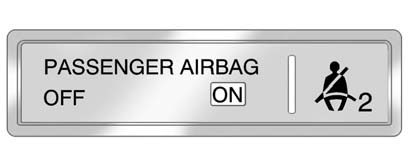
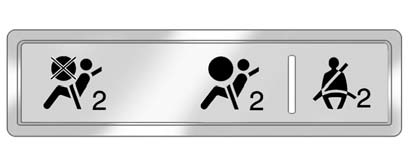
The overhead console has a passenger airbag status indicator.
 " width=409 height=166
id="_x0000_i1323" src="images/books/1183/3/index.63.gif" border=0>
" width=409 height=166
id="_x0000_i1323" src="images/books/1183/3/index.63.gif" border=0>
United States
 " width=409 height=166
id="_x0000_i1324" src="images/books/1183/3/index.64.gif" border=0>
" width=409 height=166
id="_x0000_i1324" src="images/books/1183/3/index.64.gif" border=0>
Canada and Mexico
When the vehicle is started, the passenger airbag status indicator will light ON and OFF, or the symbol for on and off, for several seconds as a system check. If you are using remote start, if equipped, to start the vehicle from a distance you may not see the system check. Then, after several more seconds, the status indicator will light either ON or OFF, or either the on or off symbol to let you know the status of the right front passenger frontal and seat—mounted side impact airbag.
If the word ON or the on symbol is lit on the passenger airbag status indicator, it means that the right front passenger frontal airbag and seat—mounted side impact airbag are enabled (may inflate).
If the word OFF or the off symbol is lit on the passenger airbag status indicator, it means that the passenger sensing system has turned off the right front passenger frontal and seat—mounted side impact airbag.
If, after several seconds, both status indicator lights remain on, or if there are no lights at all, there may be a problem with the lights or the passenger sensing system.
See your dealer for service.
WARNING
If the airbag readiness light ever comes on and stays on, it means that
something may be wrong with the airbag system. To help avoid injury to yourself
or others, have the vehicle serviced right away. See Airbag Readiness Light for
more information, including important safety information.
See also:
Trans (Transmission) Temp (Temperature) (CTS-V Only)
This display shows the transmission
fluid temperature in either degrees
Celsius (°C) or degrees
Fahrenheit (°F). ...
Malfunction Indicator Lamp
A computer system called OBD II (On-Board Diagnostics-Second Generation)
monitors the operation of the vehicle to ensure emissions are at acceptable
levels, to produce a cleaner environment. This li ...
Turning the RVC System On or Off
The RVC system is designed to help the driver when backing up by displaying a
view of the area behind the vehicle. When the vehicle is shifted into R (Reverse),
the video image appears on the navi ...