



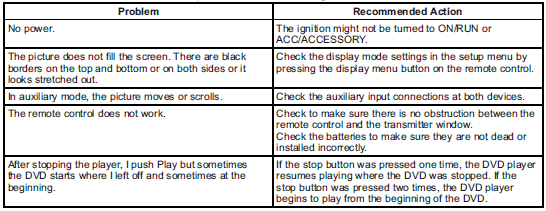
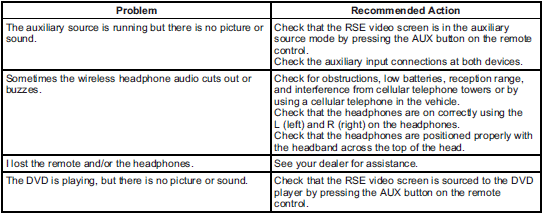
Tips and Troubleshooting Chart
Cadillac SRX / Cadillac SRX Owners Manual / Infotainment System / Rear Seat Infotainment / Rear Seat Entertainment (RSE) System / Tips and Troubleshooting Chart
See also:
Rear Window Wiper/Washer
The rear wiper controls are on the end of the windshield wiper lever.
ON: Press the upper portion of the button for continuous rear window wipes.
OFF: The rear wiper turns off when the butto ...
Driving on Hills
Driving safely on hills requires good judgment and an understanding of what the
vehicle can and cannot do.
WARNING
Many hills are simply too steep for any vehicle. Driving up hills can cause ...
Under the Hood
Base models get a 200-horsepower, 2.5-liter four-cylinder engine with direct
injection. A 270-hp, turbo 2.0-liter four-cylinder will be optional, as will
Cadillac's familiar 318-hp, 3.6-liter V-6. ...