



Engine Cover
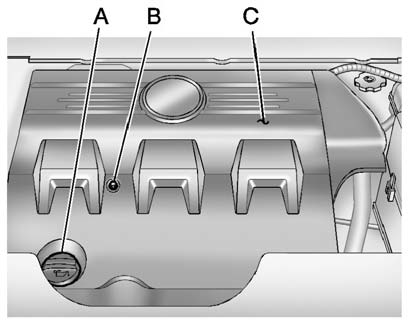
A. Oil Fill Cap
B. Engine Cover Bolt
C. Engine Cover
To remove:
1. Remove the oil fill cap (A).
2. Remove the engine cover bolt (B).
3. Raise the engine cover (C) to release from the retainers.
4. Lift and remove the engine cover.
5. Reverse Steps 1 through 4 to reinstall engine cover.
See also:
Malfunction Indicator Lamp
A computer system called OBD II (On-Board Diagnostics-Second Generation)
monitors the operation of the vehicle to ensure emissions are at acceptable
levels, to produce a cleaner environment. This li ...
Trailer Sway Control (TSC)
The vehicle has a Trailer Sway Control (TSC) feature as part of the
StabiliTrak system.
If TSC detects that the trailer is swaying, the vehicle's brakes are
automatically applied.
When TSC ...
Universal Remote System
Vehicles with the Universal Remote System will have these buttons located in
the headliner.
This system provides a way to replace up to three remote control transmitters
used to activate device ...