



License Plate Lamp
To replace one of these bulbs:
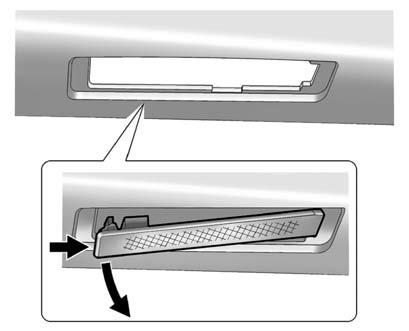
1. Open the liftgate. See Liftgate for more information.
 " width=409 height=331
id="_x0000_i1717" src="images/books/1183/8/index.21.gif" border=0>
" width=409 height=331
id="_x0000_i1717" src="images/books/1183/8/index.21.gif" border=0>
Passenger Side Shown, Driver Side Similar
2. Push the left end of the lamp assembly towards the right.
3. Turn the lamp assembly down to remove from liftgate.
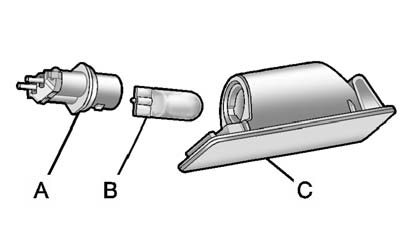
A. Bulb Socket
B. Bulb
C. Lamp Assembly
4. Turn the bulb socket (A) counterclockwise to remove from lamp assembly
(C).
5. Pull the bulb (B) straight out of the bulb socket.
6. Push the replacement bulb straight into the bulb socket and turn the bulb
socket clockwise to install into lamp assembly.
7. Turn the lamp assembly into the liftgate engaging the clip side first.
8. Push on the lamp side opposite the clip until the lamp assembly snaps into
place.
See also:
Listing Stored Numbers
The list command will list all the stored numbers and name tags.
Using the “List” Command.
1. Press . The system responds “Ready,” followed by
a tone.
2. Say “Directory.”
3. Say “Hands Free C ...
High Intensity Discharge
(HID) Lighting
WARNING!
The low beam high intensity
discharge lighting system
operates at a very high voltage.
If you try to service any of the
system components, you could be
seriously injured. Have your ...
Brake System Warning Light
The vehicle brake system consists of two hydraulic circuits.
If one circuit is not working, the remaining circuit can still work to stop
the vehicle. For normal braking performance, both circuits ...