



Replacement Bulbs
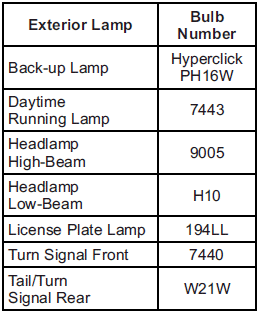
For replacement bulbs not listed here, contact your dealer.
See also:
Sun Visors
Pull the sun visor down to block
glare. Detach the sun visor from the
center mount to pivot to the side
window, or to extend along the rod,
if available. ...
Headlamp Aiming
The vehicle has a visual optical
headlamp aiming system. The aim
has been preset at the factory and
should need no further adjustment.
However, if the vehicle is damaged
in a crash, the headl ...
Rainsense™
For vehicles with Rainsense, a
sensor located near the top center
of the windshield detects the
amount of water on the windshield
and automatically controls the
frequency of the windshield w ...