



Removing the Spare Tire and Tools
To access the spare tire and tools:
1. Open the liftgate. See Liftgate .
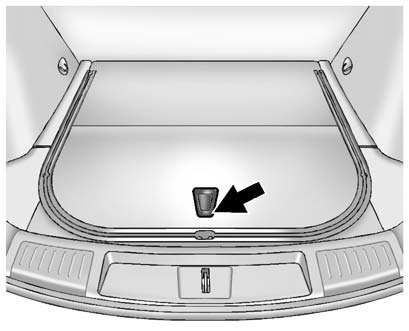
2. Press on the bottom of the handle assembly to unlatch it and lift up on the handle.
The prop rod locks into place when open.
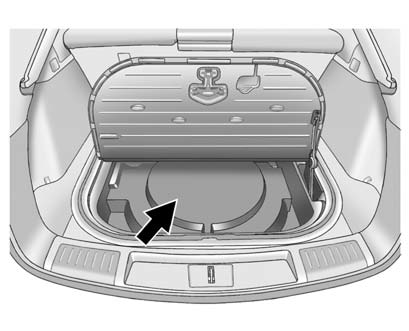
3. Remove the spare tire cover.
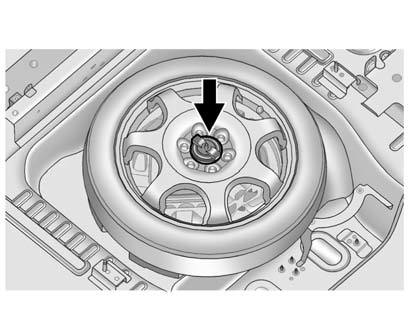
4. Remove the nut retaining the spare tire.
5. Remove the spare tire and place it next to the tire being changed.
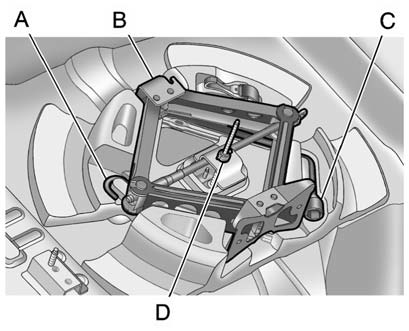
6. Remove the wing nut (D).
7. Remove the extension (A), jack (B) and wheel wrench (C) and place them near
the tire being changed.
See also:
Sun Visors
Pull the sun visor down to block glare. Detach the sun visor from the center
mount to pivot to the side window, or to extend along the rod, if available. ...
StabiliTrak® System
The vehicle has a vehicle stability enhancement system called StabiliTrak.
It is an advanced computer controlled system that assists with directional
control of the vehicle in difficult driving cond ...
Passenger Sensing System
The passenger sensing system, if equipped, turns off the front outboard passenger
frontal airbag under certain conditions. No other airbag is affected by the passenger
sensing system.
If the vehi ...