



Automatic Headlamp System
When it is dark enough outside, the automatic headlamp system turns on the headlamps at the normal brightness, along with the taillamps, sidemarker, parking lamps, and the instrument panel lights. The radio lights will also be dim.
To turn off the automatic headlamp system, turn the exterior lamps switch to the off position and then release it.
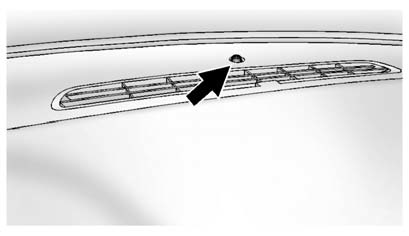
The vehicle has a light sensor located on the top of the instrument panel which regulates when the automatic headlamps turn on. Do not cover the sensor, otherwise the headlamps will come on whenever the ignition is on.
The system may also turn on the headlamps when driving through a parking garage, heavy overcast weather, or a tunnel. This is normal.
There is a delay in the transition between the daytime and nighttime operation of the automatic headlamp system so that driving under bridges or bright overhead street lights does not affect the system. The automatic headlamp system is only affected when the light sensor detects a change in lighting lasting longer than the delay.
If the vehicle is started in a dark garage, the automatic headlamp system will come on immediately. Once the vehicle leaves the garage, it takes approximately one minute for the automatic headlamp system to change if it is bright enough outside. During that delay, the instrument panel cluster may not be as bright as usual. Make sure the instrument panel brightness control is in the full bright position. See Instrument Panel Illumination Control .
To idle the vehicle with the automatic headlamp system off, turn the control to the off position.
The headlamps will also stay on after you exit the vehicle. This feature can be programmed using the Driver Information Center (DIC). See Vehicle Personalization .
The regular headlamp system can be turned on when needed.
See also:
Off-Road Recovery
The vehicle's right wheels can
drop off the edge of a road onto
the shoulder while driving.
Follow these tips:
1. Ease off the accelerator and
then, if there is nothing in the
way, steer t ...
Jump Starting
For more information about the vehicle battery, see Battery .
If the vehicle is a hybrid, see the hybrid supplement for more information.
If the vehicle's battery has run down, you may wan ...
Chime Volume
This allows the selection of the chime volume level.
Press the MENU/SELECT knob when Chime Volume is highlighted.
Turn the knob to select Normal or High. Press the knob to confirm and go
back t ...