



Low Fuel Warning
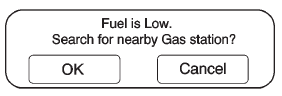
When the fuel in the vehicle becomes low, a pop-up displays “Fuel is low. Search for nearby Gas station?”
1. Press OK to show a list of nearby gas stations.
2. Press GO next to the desired gas station for location information.
3. Press Cancel if the list of Near Gas Station is not needed.
For more information, see Driver Information Center (DIC) .
See also:
Weatherstrips
Apply silicone grease on weatherstrips to make them last longer, seal better,
and not stick or squeak. See Recommended Fluids and Lubricants . ...
Liftgate
Power Liftgate
Vehicles with an automatic
transmission must be in P (Park)
and a manual transmission must be
in Neutral to operate the power
liftgate.
To open the liftgate from inside,
s ...
Fuel E85 (85% Ethanol)
Vehicles that have a FlexFuel badge and a yellow fuel cap can use either unleaded
gasoline or ethanol fuel containing up to 85% ethanol (E85). See Fuel E85 (85% Ethanol) . For all other vehicl ...