



Trunk Lock Release
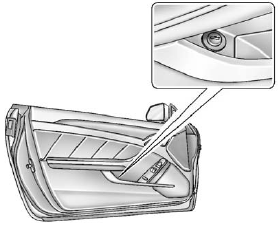
Trunk Lock Release
The remote trunk release button is on the driver door, inside the storage compartment under the armrest.
Vehicles with an automatic transmission, the shift lever must be in P (Park) or N (Neutral).
Vehicles with a manual transmission, the shift lever must be in Neutral, and the parking brake set .
The trunk may be opened by
pressing the remote trunk release
button on the driver door, or  on
the Remote Keyless Entry (RKE)
transmitter, or the trunk release
button located on the rear of the
trunk above the license plate.
on
the Remote Keyless Entry (RKE)
transmitter, or the trunk release
button located on the rear of the
trunk above the license plate.
Vehicles with the Keyless Access System, if the vehicle is locked, the keyless access transmitter must be within 1m (3 ft) of the trunk for it to be recognized, then the trunk can be opened by the trunk release button located above the license plate.
If the vehicle is ever without power, the trunk area can still be accessed.
On vehicles with a rear seat pass-through door:
1. Fold the rear armrest down and open the pass-through door.
See “Rear-Seat Pass Through” following for more information.
2. Reach upward through the opening to locate the emergency trunk release handle. See “Emergency Trunk Release Handle” following for more information.
3. Pull forward on the trunk release handle to open the trunk lid.
On vehicles with a split folding rear seat:
1. Fold down the rear seatback.
See Rear Seats for more information.
2. Reach upward through the opening to locate the trunk release handle.
3. Pull forward on the trunk release handle to open the trunk lid.
Close the trunk by pulling on the handle. Do not use the handle as a tie-down.
See also:
Fabric/Carpet
Start by vacuuming the surface using a soft brush attachment. If a rotating brush
attachment is being used during vacuuming, only use it on the floor carpet. Before
cleaning, gently remove as much ...
Total Weight on the
Vehicle's Tires
Inflate the vehicle's tires to the
upper limit for cold tires. These
numbers can be found on the
Certification label or see Vehicle
Load Limits. Do not
go over the GVW limit for the
vehicl ...
California Proposition
65 Warning
Most motor vehicles, including this
one, contain and/or emit chemicals
known to the State of California to
cause cancer and birth defects or
other reproductive harm. Engine
exhaust, many par ...