



OnStar Overview
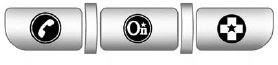
If equipped, this vehicle has a comprehensive, in-vehicle system that can connect to a live Advisor for Emergency, Security, Navigation, Connection, and Diagnostic Services.
The OnStar system status light is next to the OnStar buttons. If the status light is:
- Solid Green: System is ready.
- Flashing Green: On a call.
- Red: Indicates a problem.
Push  or call 1–888–4–ONSTAR
(1–888–466–7827) to speak to an
Advisor.
or call 1–888–4–ONSTAR
(1–888–466–7827) to speak to an
Advisor.
Push  to:
to:
- Make a call, end a call, or answer an incoming call.
- Give OnStar Hands-Free Calling voice commands.
- Give OnStar Turn-by-Turn Navigation voice commands.
Requires the available Directions and Connections service plan.
Push to connect to a live
Advisor to:
- Verify account information or update contact information.
- Get driving directions. Requires the available Directions and Connections service plan.
- Receive On-Demand Diagnostics for a check on the vehicle’s key operating systems.
- Receive Roadside Assistance.
Push  to get a priority
connection
to an Emergency Advisor available
24/7 to:
to get a priority
connection
to an Emergency Advisor available
24/7 to:
- Get help for an emergency.
- Be a Good Samaritan or respond to an AMBER Alert.
- Get crisis assistance and evacuation routes.
See also:
3-D Lane Guidance
Some major metropolitan areas may include a 3-D lane guidance feature for highway
exits and junctions. This feature gives you an enhanced representation of the exits
and junctions on the route. ...
Power Door Locks
Instrument Panel
Front Door Panels
(Lock): Press to lock the doors.
(Unlock):
Press to unlock the doors. ...
Oil Pressure (CTS-V Only)
This display shows the oil pressure
in either kilopascals (kPa) or pounds
per square inch (psi). ...