



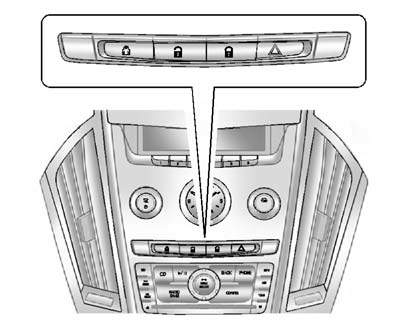
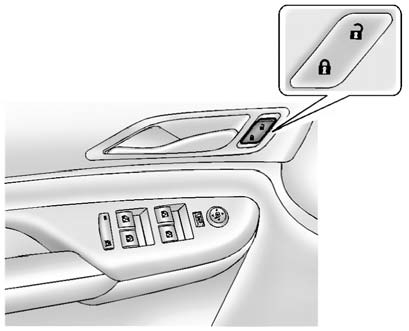
Power Door Locks
 " width=409 height=331
id="_x0000_i1162" src="images/books/1183/1/index.112.gif" border=0>
" width=409 height=331
id="_x0000_i1162" src="images/books/1183/1/index.112.gif" border=0>
Instrument Panel
 " width=409 height=331
id="_x0000_i1163" src="images/books/1183/1/index.113.gif" border=0>
" width=409 height=331
id="_x0000_i1163" src="images/books/1183/1/index.113.gif" border=0>
Front Door Panels
 (Lock): Press to lock the doors.
 (Unlock):
Press to unlock the doors.
(Unlock):
Press to unlock the doors.
See also:
SERVICE SIDE BLIND ZONE
ALERT SYSTEM
If this message appears, both SBZA
displays will remain on indicating
there is a problem with the SBZA
system. If these displays remain on
after continued driving, the system
needs service. ...
Remote Vehicle Start
This feature allows you to start the engine from outside of the vehicle. It may
also start up the vehicle's heating or air conditioning systems and rear window
defogger. Normal operation of th ...
Cruise Control
WARNING
Cruise control can be dangerous where you cannot drive safely at a steady
speed. So, do not use the cruise control on winding roads or in heavy traffic.
Cruise control can be dangerous on ...