



Storing the Fe
1. Lift the cargo management system cover.
2. Release the cover from the prop rod as described in the previous steps.
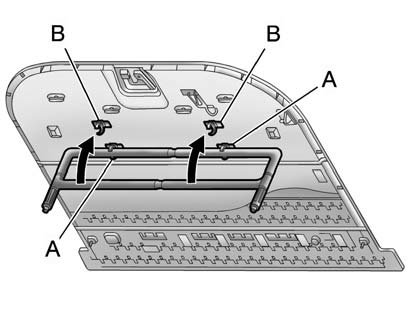
3. Insert the top of the fence into the lower two clips (A).
4. Turn the bottom of the fence up and insert it into the upper two clips (B).
See also:
Previous Destination
The previous destination entry method lets you select a destination from a list
of previous destination points.
Previous Destination: Press to access
the Previous Destination screen. The syste ...
Extending Engine Run Time
To extend the engine run time by
10 minutes, repeat Steps 1 and 2
while the engine is still running.
The engine run time can only be
extended if it is the first remote start
since the vehicle ...
Shutting the Engine Off After a Remote Start
To cancel a remote start, do any of the following:
- Press until the parking lamps turn off.
- Turn on the hazard warning flashers.
- Turn the vehicle on and then back off. ...