



Transmission
Driver Shift Control (DSC)
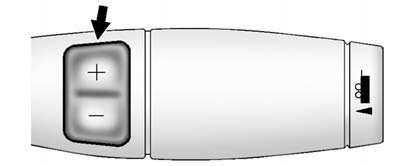
The DSC switch is located on the shift lever.
To enable the DSC feature:
1. Move the column shift lever to the M(Manual) position. The Driver Information Center (DIC) display will show the message MANUAL SHIFT on the first line and the current gear will be displayed on the second line. This is the highest attainable range with all lower gears accessible. As an example, when 5 (Fifth) gear is selected, 1 (First) through 5 (Fifth) gears are available.
2. Press the plus/minus buttons, located on the steering column shift lever, to select the desired range of gears for current driving conditions. See Manual Mode .
While using DSC, cruise control and the tow/haul mode can be used.
Grade Braking is not available when DSC is active. See Tow/Haul Mode .
See also:
Magnetic Ride Control
With this feature on the CTS-V,
the Magnetic Ride Control system
adjusts the ride of the vehicle to
Tour or Sport modes. Magnetic Ride
Control monitors the suspension
system to determine the ...
Rear Climate Control System (Rear Climate with Rear Seat Audio)
For vehicles with the rear heat and air conditioning controls, they are integrated
with the rear seat audio controls located in the center console. The system can
be controlled from the front cont ...
Headlamp Aiming
The vehicle has a visual optical
headlamp aiming system. The aim
has been preset at the factory and
should need no further adjustment.
However, if the vehicle is damaged
in a crash, the headl ...