



Driving on a Route
When driving on a routed destination, the map screen automatically displays the next maneuver.

The pop-up displays the next maneuver direction and the distance from it.
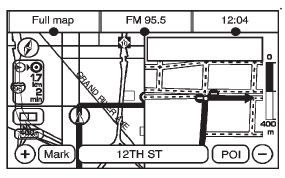
When approximately 400 m (1/4 mi) from the next maneuver, the screen displays the name and a detailed view of it.
See also:
Defensive Driving
Defensive driving means “always expect the unexpected.” The first step in driving
defensively is to wear the safety belt. See Safety Belts .
Assume that other road users (pedestrians, bicy ...
Remote Control
To use the remote control, aim at the remote sensor located on top center of
the video display screen and press the desired button.
Objects blocking the line-of-sight can affect the function of the ...
Additional Factors Affecting System Operation
Safety belts help keep the passenger in position on the seat during vehicle
maneuvers and braking, which helps the passenger sensing system maintain the
passenger airbag status.
See “Safety Belts ...