



Remote Keyless Entry (RKE) System
On some models, the RKE transmitter is used to lock and unlock the doors from up to 20m (65 ft) away from the vehicle.
On other models, it can be used up to 60m (195 ft) away.
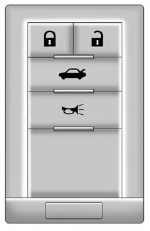
Key Access
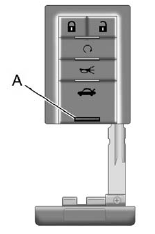
Keyless Access
Press  to unlock the driver door.
Press again within five seconds to unlock all remaining doors.
Press  to lock all doors.
Lock and unlock feedback can be personalized. See Vehicle Personalization.
Press and hold  to open
the trunk/liftgate.
to open
the trunk/liftgate.
Press  and release to locate the
vehicle.
and release to locate the
vehicle.
Press and hold for more than
two seconds to sound the panic
alarm.
Press again to cancel the panic
alarm.
For keyless access vehicles, press the button (A) to remove the key.
The key can be used for all locks.
See Keys and Remote Keyless Entry (RKE) System Operation (Keyless Access) or Remote Keyless Entry (RKE) System Operation (Key Access).
See also:
Engine Cooling System Messages
ENGINE HOT A/C
(AIR CONDITIONING) OFF
This message displays when the
engine coolant becomes hotter than
the normal operating temperature.
See Engine Coolant Temperature
Gauge. To avoid
add ...
Control Buttons
The buttons used to control the radio are:
RADIO/BAND: Press to turn the radio on and choose between AM, FM, and XM™,
if equipped.
MENU/SELECT: Press and turn to navigate the available menus.
...
Tire Designations
Tire Size
The following is an example of
a typical passenger vehicle
tire size.
(A) Passenger (P–Metric) Tire:
The United States version of
a metric tire sizing system.
The letter P as the ...