



Memory Features
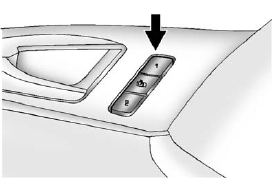
On vehicles with the memory package, memory buttons 1 and 2 on the driver door are used to save and recall memory settings for the driver seat cushion and seatback, outside mirrors, and the steering column position, if the vehicle is equipped with the power tilt and telescopic steering column.
1: Saves and recalls for driver 1.
2: Saves and recalls for driver 2.
 : Moves the driver seat and/or
power steering column to the exit
position. See “Exit Recall” later in
this section.
: Moves the driver seat and/or
power steering column to the exit
position. See “Exit Recall” later in
this section.
See also:
Diagnostics
OnStar Vehicle Diagnostics will perform a vehicle check every month. It will
check the engine, transmission, antilock brakes, and major vehicle systems.
It also checks the tire pressures, if the v ...
Leaving After Parking on a Hill
1. Apply and hold the brake pedal
while you:
1.1. Start the engine.
1.2. Shift into a gear.
1.3. Release the parking brake.
2. Let up on the brake pedal.
3. Drive slowly until the trailer is
...
Engine Coolant Temperature Gauge
Metric
English
This gauge measures the temperature of the vehicle's engine.
If the indicator needle moves into the shaded area, the engine is too hot.
While driving under normal op ...