



Sunroof
If the vehicle has a power sunroof it will only operate when the ignition is in ON/RUN or ACC/ACCESSORY, or when Retained Accessory Power (RAP) is active. See Ignition Positions (Key Access) or Ignition Positions (Keyless Access) and Retained Accessory Power (RAP).
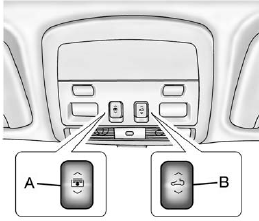
The driver side switch (A) operates the sunshade.
Open/Close: Press and hold the front or rear of the switch (A) to open or close the sunshade.
Express Open/Express Close:
Press and release the rear or front of the switch (A) to express open or express close the sunshade. To stop the sunshade partway, press the switch (A) a second time.
The passenger side switch (B) operates the sunroof.
Vent: Coupe only, press and hold the front of the switch (B) to vent the sunroof. The sunshade will automatically open approximately fifteen inches. Press and hold the rear of the switch (B) to close the sunroof vent.
Express Open/Express Close:
Press and release the rear or front of the switch (B) to express open or express close the sunroof. To stop the sunroof partway, press the switch (B) a second time.
Comfort Stop: The sunroof has a comfort stop feature that stops the sunroof from opening to the full-open position. Press the rear of the sunroof switch (B) to the first detent to open the sunroof to the comfort open position. Press the rear of the switch (B) again to fully open the sunroof.
For more information see Sunroof.
See also:
Power Door Locks
Instrument Panel
Front Door Panels
(Lock): Press to lock the doors.
(Unlock):
Press to unlock the doors. ...
Fuel System Messages
FUEL LEVEL LOW
This message displays and a chime sounds if the fuel level is low. Refuel as
soon as possible. See Fuel Gauge and Fuel for more information.
TIGHTEN GAS CAP
...
Active Head Restraints
The vehicle has an active head
restraint system in the front seating
positions. These automatically tilt
forward to reduce the risk of neck
injury if the vehicle is hit from
behind. ...