



Battery Replacement
Notice: When replacing the battery, do not touch any of the circuitry on the transmitter.
Static from your body could damage the transmitter.
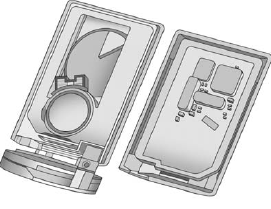
1. Remove the key from the transmitter by pressing the thin button near the bottom of the transmitter and pulling the key out. Do not pull the key out without pressing the button.
2. Separate the transmitter with a flat, thin object inserted into the slot on the side of the transmitter.
Do not try to separate the transmitter by inserting a flat, thin object into the key slot.
This will permanently damage the transmitter.
3. Remove the old battery. Do not use a metal object.
4. Insert the new battery, positive side facing down. Replace with a CR2032 or equivalent battery.
5. Snap the transmitter back together.
6. Reinstall the key into the transmitter.
See also:
Daytime Running
Lamps (DRL)
Daytime Running Lamps (DRL) can
make it easier for others to see the
front of your vehicle during the day.
Fully functional daytime running
lamps are required on all vehicles
first sold in Ca ...
When to Check Lubricant
It is not necessary to regularly check rear axle fluid unless there is a leak
suspected or an unusual noise is heard. A fluid loss could indicate a problem. Have
it inspected and repaired.
All ax ...
Additional Factors Affecting System Operation
Safety belts help keep the
passenger in position on the seat
during vehicle maneuvers and
braking, which helps the passenger
sensing system maintain the
passenger airbag status.
See “Safety ...