



Lumbar Adjustment
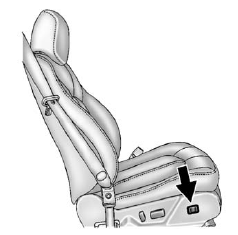
If available, hold the control on the outboard side of the seat forward or rearward to increase or decrease the lumbar support on the driver or front passenger seat.
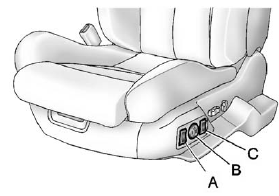
A. Side Bolster Adjustment
B. Lumbar Support Adjustment
C. Seatback Bolster Adjustment
See also:
Retained Accessory Power (RAP)
These vehicle accessories can be
used for up to 10 minutes after the
engine is turned off:
- Audio System
- Power Windows
- Sunroof (if equipped)
Power to the audio system will work
up to 10 ...
Resuming a Set Speed
If the cruise control is set at a
desired speed and then the brakes
are applied, the cruise control is
disengaged without erasing the set
speed from memory.
Once the vehicle is driving at abo ...
Interior
Two occupants fit inside the XLR's luxurious interior, which features
eucalyptus wood and aluminum accents. The seatbacks and cushions are heated and
cooled. The DVD navigation/entertainment syste ...