



Engine Cover
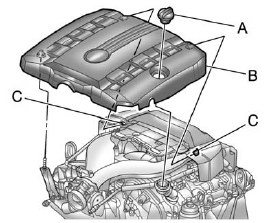
Engine Cover (CTS)
To remove:
1. Remove the oil fill cap (A).
2. Raise the right front corner of the engine cover (B) to release it from the ball stud.
3. Pull the engine cover (B) forward to slide the rear tabs (C) out from under the retainers.
4. Lift and remove the engine cover.
5. Reverse Steps 1 through 4 to reinstall the engine cover.
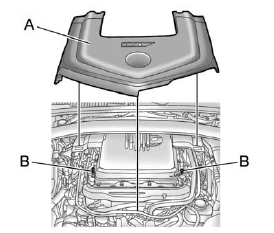
Engine Cover (CTS-V)
To remove:
The engine cover consists of two pieces. Only the larger front piece needs to be removed to access the engine oil and power steering fill caps.
1. Raise the front of the engine cover (A) to release it from the ball studs (B).
2. Pull the engine cover forward until it is clear of the smaller piece.
3. Lift and remove the engine cover.
4. Reverse Steps 1 through 3 to reinstall the engine cover.
See also:
Scheduling Service
Appointments
(U.S. and Canada)
When the vehicle requires
warranty service, contact your
dealer and request an appointment.
By scheduling a service
appointment and advising the
service consultant of your
transportation ne ...
Empty Directory or Folder
If a root directory or a folder exists
somewhere in the file structure that
contains empty folders and no
compressed files in them, the player
advances to the next folder in the
file structu ...
Automatic Door Locks
For vehicles with an automatic
transmission, the doors will lock
automatically when all doors are
closed, the ignition is on, and the
shift lever is moved out of P (Park).
The doors will auto ...