



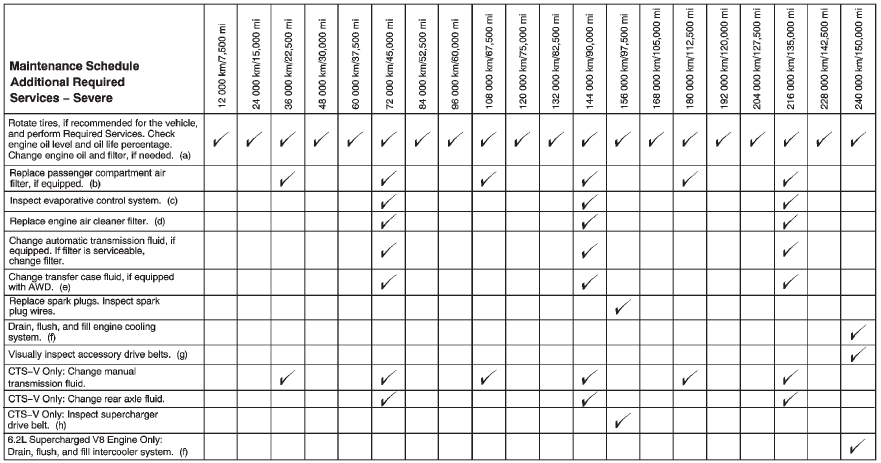
Footnotes — Maintenance Schedule Additional Required Services — Normal
a) Vehicles with different size front and rear tires do not have tire rotation. See Tire Rotation.
b) Or every two years, whichever comes first. More frequent replacement may be needed if the vehicle is driven in areas with heavy traffic, areas with poor air quality, or areas with high dust levels.
Replacement may also be needed if there is a reduction in air flow, excessive window fogging, or odors.
c) Check all fuel and vapor lines and hoses for proper hook–up, routing, and condition. Check that the purge valve, if the vehicle has one, works properly. Replace as needed.
d) Or every four years, whichever comes first.
e) Do not directly power wash the transfer case output seals. High pressure water can overcome the seals and contaminate the transfer case fluid. Contaminated fluid will decrease the life of the transfer case and should be replaced.
f) Or every five years, whichever comes first. See Cooling System.
g) Or every 10 years, whichever comes first. Inspect for fraying, excessive cracking, or damage; replace, if needed.
h) Inspect for fraying, excessive cracking, or damage; replace, if needed.
See also:
DIC Buttons
A. SET/CLR (Set/Clear): Use this button to set or clear the menu item when
it is displayed.
B. (Thumbwheel): Use the thumbwheel to scroll through the items in each
menu.
A small marker wil ...
Listing Stored Numbers
The list command will list all the stored numbers and name tags.
Using the “List” Command.
1. Press . The system responds “Ready,” followed by
a tone.
2. Say “Directory.”
3. Say “Hands Free C ...
Overview
Cadillac introduced the 2013 ATS, an all-new compact luxury sports sedan
intended to challenge the world's best premium cars. Developed on an all-new,
lightweight vehicle architecture, Cadillac's ...