



Power Mirrors
 " width=410 height=331
id="_x0000_i1180" src="images/books/1183/1/index.123.gif" border=0>
" width=410 height=331
id="_x0000_i1180" src="images/books/1183/1/index.123.gif" border=0>
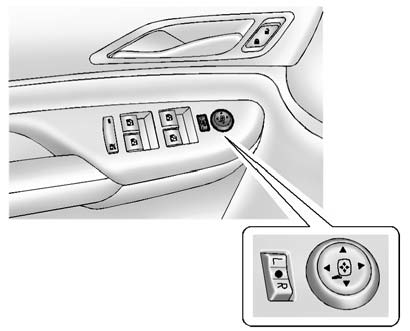
Manual Folding Mirrors Shown
To adjust the mirror:
1. Move the selector switch to L (Left) or R (Right) to choose the driver or
passenger mirror.
2. Press the arrows on the control pad to move each mirror in the desired
direction.
3. Return the selector switch to the center position.
See also:
Interior amenities
Recaro performance driving seats are optional in the Cadillac CTS-V Coupe and
provide excellent support for spirited driving. These 14-way adjustable
performance seats include pneumatic bolster co ...
CTS Coupe in the Market
In terms of arresting exterior design and luxurious cabin furnishings, the
CTS coupe has it made. Many coupe buyers, though, want more than a car that just
looks great: They want something that go ...
CUE and ATS technologies
The ATS is offered with Cadillac CUE, a comprehensive, in-vehicle experience
that merges intuitive design with auto industry-first controls and commands for
information and entertainment data. It ...