



Heated Rear Seats
WARNING
If you cannot feel temperature change or pain to the skin, the seat heater may
cause burns even at low temperatures.
See the Warning under Heated and Ventilated Front Seats.
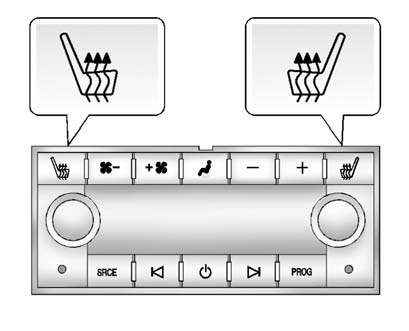
If available, the buttons are on the Rear Sear Audio (RSA) panel on the rear of the center console.
With the ignition in ON/RUN/START, press  to heat the left or" width=57 height=18
id="_x0000_i1213" src="images/books/1183/2/index.56.gif" border=0>to heat the left or
right outboard seat cushion and seatback. An indicator on the RSA display
appears when this feature is on.
to heat the left or" width=57 height=18
id="_x0000_i1213" src="images/books/1183/2/index.56.gif" border=0>to heat the left or
right outboard seat cushion and seatback. An indicator on the RSA display
appears when this feature is on.
Press the button once for the highest setting. With each press of the button, the heated seat changes to the next lower setting, and then the off setting. Three lights indicate the highest setting, and one light indicates the lowest.
See also:
Using the Base RSE On-Screen Display (OSD) Menus
Use the OSD setup display menus for:
Initial setup
Display setup
Parental control setup
Adjusting the picture quality
Setting the various outputs
On-screen display language
To use the ...
Manual Mode
Driver Shift Control (DSC) or
Tap Shift
Notice: Driving with the engine
at a high rpm without upshifting
while using Driver Shift Control
(DSC), could damage the vehicle.
Always upshift when ...
Memory Features
On vehicles with the memory
package, memory buttons 1 and 2
on the driver door are used to save
and recall memory settings for the
driver seat cushion and seatback,
outside mirrors, and th ...