



Cupholders
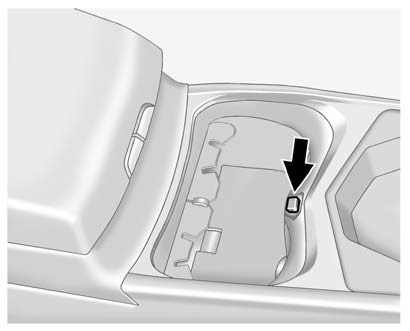
This vehicle has a cupholder equipped with a divider that can be adjusted to accommodate large containers or small containers.
For large containers, push the button to move aside the divider and make the cupholder deeper.
For small containers, push down on the top edge of the divider to lock it back in place and make the cupholder shorter.
See also:
Weight of the Trailer
How heavy can a trailer safely be?
It depends on how the rig is used. Speed, altitude, road grades, outside temperature
and how much the vehicle is used to pull a trailer are all important. It can ...
Power Steering Fluid
See Engine Compartment Overview for the location of the
power steering fluid reservoir.
When to Check Power
Steering Fluid
It is not necessary to regularly
check power steering fluid unless ...
Hill and Mountain Roads
Driving on steep hills or through
mountains is different than driving
on flat or rolling terrain. Tips for
driving in these conditions include:
- Keep the vehicle serviced and in
good shape.
...