



Install the Cargo Cover
1. Hold the cartridge so that the pull-out shade faces the rear of the vehicle.
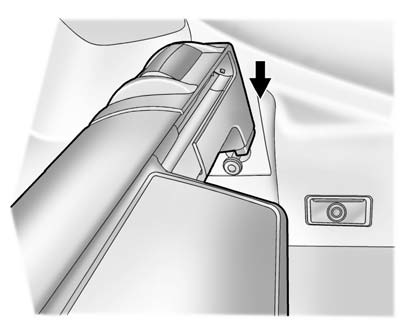
2. Align the cartridge over the pins on the trim panels of the vehicle.
3. Push down on the cartridge to snap it into place.
4. Unroll the shade toward the rear of the vehicle.
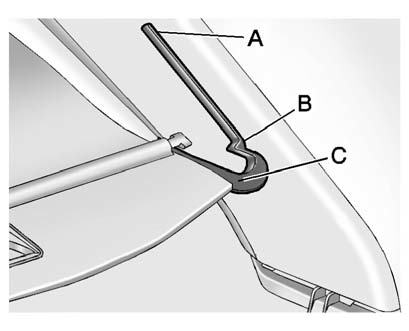
5. Insert the shade pins in the channels (C) on both sides.
6. Slide the shade to the lower (B) position, or the halfway open (A) position.
See also:
Navigation Control Buttons
The following control buttons are located on the navigation system:
(Power/Volume):
1. Press to turn the system on and off.
2. Turn to increase or decrease the volume to the audio system.
3. Pres ...
Lumbar Adjustment
If available, hold the control on the
outboard side of the seat forward or
rearward to increase or decrease
the lumbar support on the driver or
front passenger seat.
A. Side Bolster Adjus ...
What Will You See after an Airbag Inflates?
After the frontal airbags and seat-mounted side impact airbags inflate, they
quickly deflate, so quickly that some people may not even realize an airbag inflated.
Roof-rail airbags may still be at ...