



Twilight Sentinel
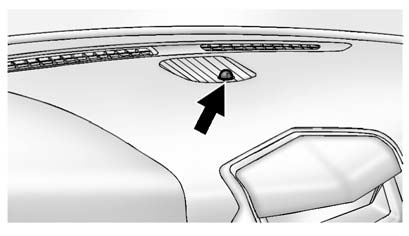
This feature automatically turns the lamps on and off. A light sensor on top of the instrument panel makes the Twilight Sentinel® work, so be sure it is not covered.
With Twilight Sentinel the following will happen:
- When it is dark enough outside, and the exterior lamp control is in the AUTO position, the Daytime Running Lamps (DRL) go off, and the headlamps and parking lamps come on.
The other lamps that come on with the headlamps also come on.
- When it is bright enough outside, the headlamps go off, and the DRL come on, as long as the exterior lamp control is in the AUTO position. See Exterior Lamp Controls.
If the vehicle is started in a dark garage, the automatic headlamp system comes on immediately.
If it is light outside when the vehicle leaves the garage, there is a slight delay before the automatic headlamp system changes to the DRL. During that delay, the instrument panel cluster may not be as bright as usual. Make sure the instrument panel brightness control is in full bright position.
See Instrument Panel Illumination Control for more information.
The vehicle can be idled with the lamps off, even when it is dark outside. After starting the vehicle, turn the exterior lamps control to off, then release it. The lamps will remain off until the control is turned to off again.
Twilight Sentinel also provides exterior illumination as you leave the vehicle. If Twilight Sentinel has turned on the lamps when the ignition is turned off, the lamps remain on until one of the following occurs:
- The exterior lamp control is moved from  to the parking lamp" width=17 height=16
id="_x0000_i1358" src="images/books/1183/3/index.98.gif" border=0>to the parking lamp
position.
to the parking lamp" width=17 height=16
id="_x0000_i1358" src="images/books/1183/3/index.98.gif" border=0>to the parking lamp
position.
- The delay time selected has elapsed.
See Vehicle Personalization to select the delay time.
You can also select no delay time.
If the ignition is turned off with the exterior lamps control in the parking lamp or headlamp position, the Twilight Sentinel delay will not occur. The lamps will turn off as soon as the control is turned off.
The regular headlamp system should be turned on when needed.
See also:
Transmission
Driver Shift Control (DSC)
The DSC switch is located on the shift lever.
To enable the DSC feature:
1. Move the column shift lever to the M(Manual) position. The Driver Information
Center (DIC) ...
Vehicle Speed Messages
ICE POSSIBLE DRIVE
WITH CARE
This message displays when the
outside temperature is cold enough
to create icy road conditions.
Adjust your driving accordingly.
SPEED LIMITED TO
XXX KM/H (MPH ...
Cooling System
When it is safe to lift the hood:
A. Engine Cooling Fan (Out of View)
B. Engine Coolant Surge Tank and Pressure Cap
WARNING
An electric engine cooling fan under the hood can start up even ...