



Instrument Panel Illumination Control
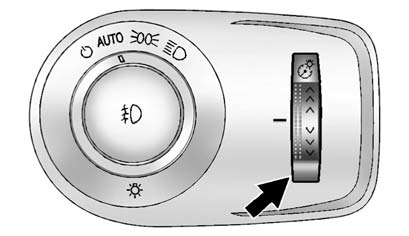
The brightness of the instrument panel lights and steering wheel controls can be adjusted.
 (Instrument Panel Brightness): Move and hold the thumbwheel up or down
to brighten or dim the lights.
(Instrument Panel Brightness): Move and hold the thumbwheel up or down
to brighten or dim the lights.
See also:
Antilock Brake System (ABS)
This vehicle has the Antilock Brake System (ABS), an advanced electronic braking
system that helps prevent a braking skid.
When the engine is started and the vehicle begins to drive away, ABS check ...
TPMS Sensor Matching Process
Each TPMS sensor has a unique identification code. The identification code needs
to be matched to a new tire/wheel position after rotating the vehicle’s tires or
replacing one or more of the TPMS ...
Recovery Hooks
WARNING
Never pull on recovery hooks from the side. The hooks could break and you and
others could be injured. When using recovery hooks, always pull the vehicle straight
out.
Notice: Nev ...