



From Map
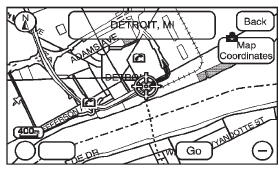
This destination entry method allows you to select a destination by scrolling on the map.
 From Map: Press to enter the From
Map destination entry method.
From Map: Press to enter the From
Map destination entry method.
To use this destination entry method:
1. Press DEST.
2. Press . A map screen displays
with the scrolling symbol.
3. Use + / - and press on the map to find the area that you would like to select as your destination.
Pressing/holding and dragging your finger on the map activates fast scrolling.
4. Press once on the area that you would like to set as your destination.
The map screen displays the address information.
5. Press GO. The map screen, with the destination marked displays. 6. Select the route preference for Fastest, Shortest, or Other. The system calculates and highlights the route.
7. Press Start Guidance. The route is now ready to be started. See “Getting Started on Your Route” in this section for more information.
See also:
Fog Lamps
Use the fog lamps for better vision
in foggy or misty conditions. The fog
lamp control is located on the turn
signal/multifunction lever.
(Fog Lamps): Turn the fog lamp
band on the lever u ...
Hill and Mountain Roads
Driving on steep hills or through
mountains is different than driving
on flat or rolling terrain. Tips for
driving in these conditions include:
- Keep the vehicle serviced and in
good shape.
...
Courtesy Transportation
Program (U.S. and
Canada)
To enhance your ownership
experience, we and our participating
dealers are proud to offer Courtesy
Transportation, a customer support
program for vehicles with the
Bumper-to-Bumper (Base War ...